Omarchy: first steps
Apr 4, 2026 · 5 min read
Recently, I started building a new setup, since I used to work on a MacBook Air M1 and now I also use a desktop. Since 2017, I have not used Windows as my daily driver, and I have always worked on some Linux distribution, initially Ubuntu and later Fedora. In 2024, to try out a new distro, I started testing Arch, installing only what I really needed for my daily workflow.
I came across DHH's Omakub project, which is based on Ubuntu, but shortly after that, an Arch-focused version appeared: Omarchy.
Why Omarchy?
I have always configured my computers for study and software development, keeping only what I actually use.
I'm a "terminal guy" - most of my day goes through CLI tools like Tmux, Neovim, Git, Docker, and other tools tied to the languages I study or use. For almost everything, I created shortcuts that speed up my workflow.
Even on macOS, my basic setup included a terminal, Neovim + LazyVim, Tmux with plugins, ZSH + Oh My Zsh, Docker or Podman, Git with aliases, and more recently Starship.
Omarchy fits right in: it comes with these tools already installed and pre-configured, except for ZSH, since it ships with Bash. Combining Arch, my usual setup, and my shortcuts felt like the ideal choice.
Installation
Omarchy can be installed in two ways: manually, by installing Arch first and then the Omarchy scripts, or by using the direct ISO.
I went with the ISO, which already comes with a default setup using BTRFS, Limine as the bootloader, and Snapper for snapshots and rollback. Since this is my personal desktop, I configured boot protection and automatic login with my user account.
Post-install Setup
Although Omarchy comes with almost everything I usually use, I needed to make a few customizations.
ZSH
Omarchy comes with Bash, so I installed ZSH and the main plugins:
yay -S zsh zsh-autosuggestions zsh-syntax-highlighting
And since I use the zsh + oh-my-zsh combination, I also installed it with:
sh -c "$(curl -fsSL https://raw.githubusercontent.com/ohmyzsh/ohmyzsh/master/tools/install.sh)"
Omarchy has several configuration files specifically for Bash, and they can all be found in ~/.local/share/omarchy/default/bash/.
One file that needs to be updated is init, which has the following configuration:
if command -v mise &> /dev/null; then
  eval "$(mise activate bash)"
fi

if command -v starship &> /dev/null; then
  eval "$(starship init bash)"
fi
...
So I adjusted my .zshrc to include the following imports and keep some of Omarchy's default Bash imports.
# ... previous zshrc setup

source ~/.config/zsh/shell
source ~/.config/zsh/aliases
source ~/.config/zsh/functions
source ~/.config/zsh/init
source ~/.config/zsh/envs
source ~/.config/zsh/inputrc
[[ -r ~/.config/zsh/secrets ]] && source ~/.config/zsh/secrets

# source from Omarchy
source ~/.local/share/omarchy/default/bash/aliases
source ~/.local/share/omarchy/default/bash/functions
source ~/.local/share/omarchy/default/bash/envs
The shell, aliases, functions, secrets, and envs files are optional, while init and inputrc are required to keep mise, zoxide, and starship working:
# init

if command -v mise &> /dev/null; then
  eval "$(mise activate zsh)"
fi

if command -v starship &> /dev/null; then
  eval "$(starship init zsh)"
fi

if command -v zoxide &> /dev/null; then
  eval "$(zoxide init zsh)"
fi

if command -v fzf &> /dev/null; then
  if [[ -f /usr/share/fzf/completion.zsh ]]; then
    source /usr/share/fzf/completion.zsh
  fi
  if [[ -f /usr/share/fzf/key-bindings.zsh ]]; then
    source /usr/share/fzf/key-bindings.zsh
  fi
fi

if [ -d /usr/share/zsh/plugins/zsh-autosuggestions ]; then
  # plugins (from system packages)
  source /usr/share/zsh/plugins/zsh-autosuggestions/zsh-autosuggestions.zsh
fi

if [ -d /usr/share/zsh/plugins/zsh-syntax-highlighting ]; then
  # starship must init before syntax-highlighting
  source /usr/share/zsh/plugins/zsh-syntax-highlighting/zsh-syntax-highlighting.zsh
fi
I copied inputrc as-is, and only the shortcut keys were changed:
# incremental history search with arrow keys
bindkey "^[[A" history-beginning-search-backward
bindkey "^[[B" history-beginning-search-forward

# Left/Right move cursor
bindkey '\e[C' forward-char
bindkey '\e[D' backward-char
Tmux
In the early versions of Omarchy, tmux was not configured and required a whole extra setup. It also did not support theme switching, which is one of the most interesting features. But in version 3.4, they added tmux with full theme support and a very solid basic configuration.
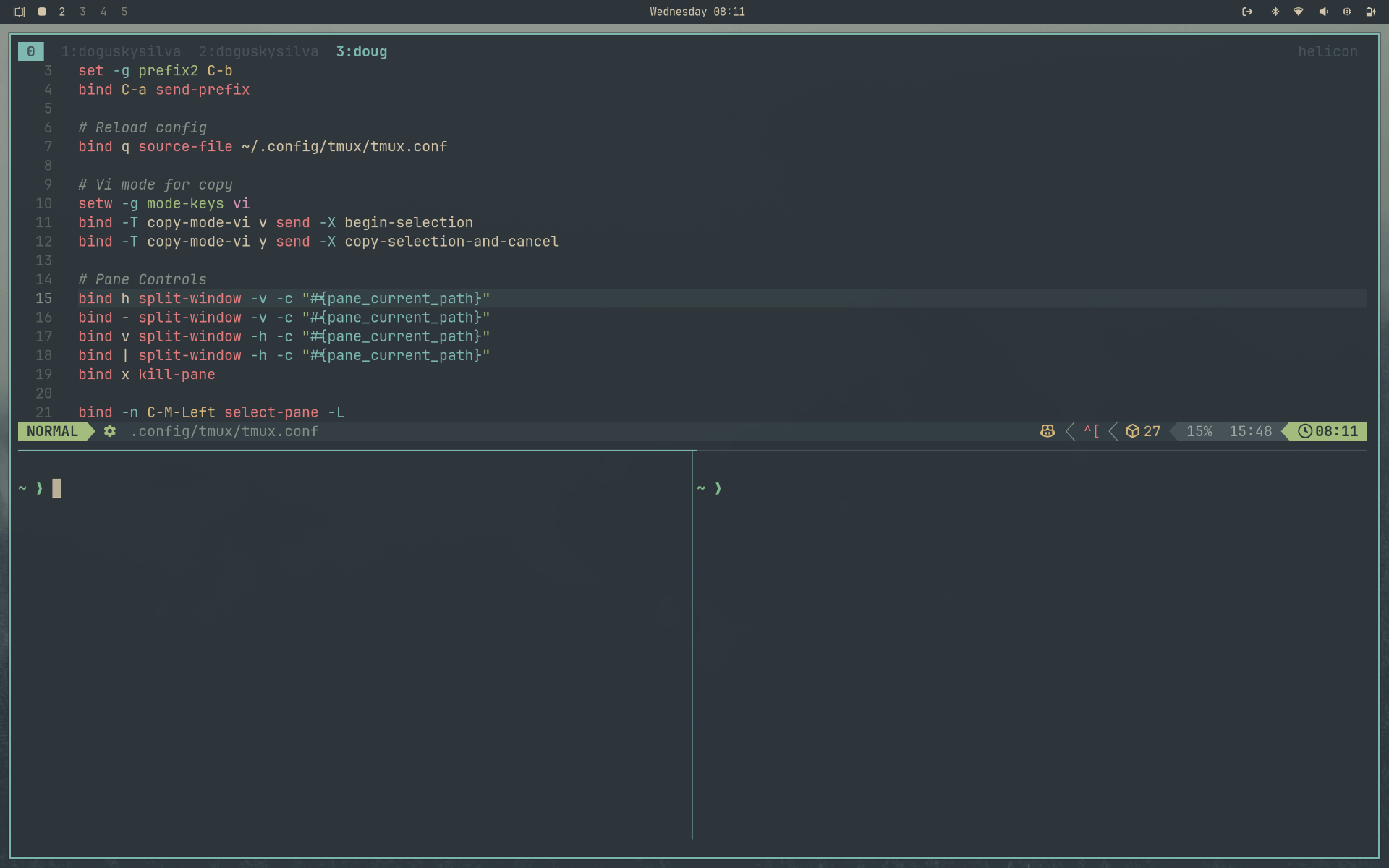
The only change I made was to a few keyboard shortcuts:
| Hotkeys | Omarchy | Personal |
|---|---|---|
| Prefix | Ctrl + Space | Ctrl + a |
| Vertical Pane | Prefix + v | Prefix + | |
| Horizontal Pane | Prefix + h | Prefix + - |
Conclusion
Omarchy turned out to be a good fit for my day-to-day use, both for using it and for setting up new machines. Recently, I bought a Lenovo Yoga Slim 7i and went through the installation process, enabled the development environments I use, pulled my backup repository with my dotfiles, and that was it: everything was ready. And the best part is that there is no friction when I switch from my laptop to my desktop, because I have exactly the same setup.
Over these 7 months, I haven't missed any of those Ubuntu, Fedora, or Mint tweaks, because, as I mentioned before, most of the time I spend in the browser or in the terminal.